
AI Website Builders vs. Professional Web Design: Which Is Right for Your Business?
AI Website Builders vs. Professional Web Design: Which Is Right for Your Business?


You have options now. You can use an AI website builder like Wix, Squarespace, or Weebly and launch a website in days for a few hundred dollars. Or you can hire a professional designer to build a custom site that’s tailored to your business, your customers, and your goals. The question isn’t which one is “better” it’s which one is right for you.
This decision matters because your website is often the first impression your potential customers get. Some businesses can thrive with an AI website builder. Others absolutely need professional web design to compete. The difference comes down to your goals, your budget, your timeline, and how seriously you’re trying to use your website to generate leads and grow your business. Let’s break it down.
What AI Website Builders Can Do in 2026
AI website builders have gotten seriously good. When you sign up for Wix ADI (Artificial Design Intelligence), Squarespace AI, or similar tools, you answer some questions about your business, and AI builds a site for you. You can then customize it with drag-and-drop editing. These tools have come a long way from the simple website builders of five years ago.
Here’s what they do well: They’re fast. You can have a live website in hours. They’re affordable – usually $20-50 per month. They’re pretty easy to use if you’re not technical. They handle hosting, SSL certificates, and backups automatically. And because they’re designed for non-designers, they tend to make decent-looking sites by default. Most AI website builders have built-in best practices that prevent you from making a site that’s completely broken.
The AI components are getting smarter. They can write basic copy, suggest layouts, recommend content structure, and even handle some basic SEO optimization. They’re especially good if you’re just starting out and need something fast and cheap to establish an online presence.
But here’s the important part: “Works” and “works great” are different things. An AI website builder will give you a functional website. It probably won’t give you a competitive advantage.
What this means for your website: YFast launch, low upfront cost, minimal learning curve. You’ll have a website that works, but it might not outperform competitors or generate as many leads.
Who it’s for:
The Cost Comparison: AI vs. Professional
This is usually the first question, and the answer is stark: AI website builders are cheap. Professional web design is expensive.
An AI website builder costs $20-100+ per month depending on features and traffic. Setup is usually $0-500. You might spend $500-2,000 in your first year, then $300-1,200 per year after that. Annual cost: $300-1,200.
Professional web design typically costs $10,000-20,000+ for a quality custom site, depending on complexity. Some agencies charge $20,000, $50,000, or more. A typical professional project might run $10,000-20,000. But here’s the thing: You pay that once (or mostly once). Ongoing maintenance and hosting are usually $100-500 per month.
So in year one: AI builder costs $500-2,000. Professional design costs $8,000-15,000+. Year two and beyond: AI builder costs $300-1,200 per year. Professional design costs $1,200-6,000 per year (hosting, maintenance, updates).
If you’re comparing pure dollar cost and nothing else, AI builders win by a lot. But “cheaper” doesn’t always mean “better value.” You have to factor in what you get.
What this means for your website: Budget-conscious businesses can get online cheap with an AI builder. Businesses that need serious lead generation should think about professional design as an investment, not just an expense.
Who it’s for:
Design Quality and Customization
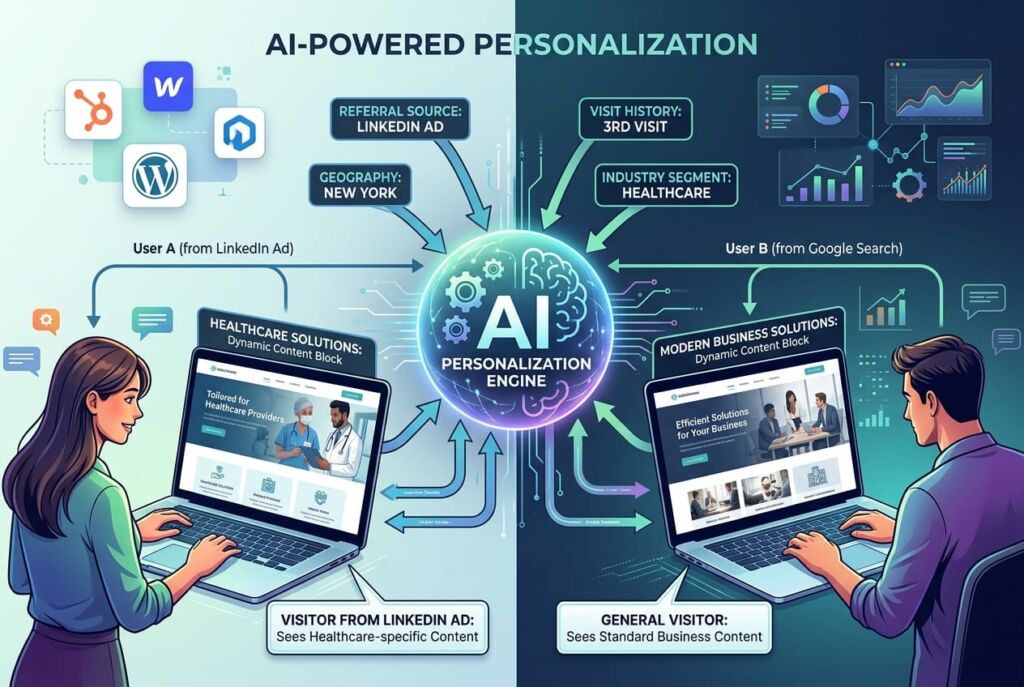
Here’s where the gap shows. An AI website builder gives you templates. They’re good templates, and AI helps personalize them, but they’re still templates. Your site will look professional out of the box. It probably won’t look dramatically different from other sites built on the same platform. There are only so many layouts an AI builder can create.
A professional designer creates something custom. They understand your business, your customers, your brand, and your competitive landscape. They can design something that’s not just professional, but genuinely unique to you. Your site doesn’t just look good – it looks like it was built specifically for your business.
Customization matters too. With an AI builder, you’re stuck with what the platform offers. Want a custom feature or an unusual layout? Too bad – the builder doesn’t support it. With professional design, especially custom WordPress sites, you can build almost anything. You can integrate custom features, APIs, workflows, and functionality that an AI builder simply can’t do.
This matters when you have specific needs. If you need appointment scheduling, custom form workflows, integration with your CRM, video testimonials, case study galleries, or anything beyond basic web pages, a professional designer can build it. An AI builder might not be able to.
What this means for your website: AI builders give you good design fast. Professional design gives you unique design that matches your specific business needs. For most service businesses, the difference in lead quality is significant.
Who it’s for:

SEO Performance
This is important, and it’s one area where professional design actually wins decisively.
AI website builders have gotten better at SEO. They have good title tag handling, meta description support, mobile optimization, and basic on-page SEO setup. They’ll help you get indexed and they understand the basics.
But here’s what they often don’t handle well: Technical SEO depth, customization for your specific keywords, scalability for big content libraries, and integration with advanced SEO tools. If you need to rank for competitive keywords in your local market, an AI builder might not get you there.
Professional designers – especially those who understand SEO – can build sites that are optimized from the ground up. They control the site architecture. They can optimize internal linking strategy. They can integrate with SEO tools that AI builders don’t support. They can build sites that scale with content. They understand content strategy, not just template optimization.
Real numbers: We’ve seen sites built on AI builders rank okay for local searches and very generic terms. But when you’re competing with other service businesses for specific keywords (“plumber near me,” “personal injury lawyer Seattle,” “dog trainer Portland”), professional design usually wins because the site structure, content architecture, and SEO strategy are more thoughtful.
What this means for your website: AI builders work for basic SEO. Professional design works for competitive SEO. If you’re trying to own search results in your market, you need professional design.
Who it’s for:
Scalability and Integrations
This is where professional design really shows its advantage.
An AI website builder lets you manage one site on one platform. If you want to integrate your e-commerce store, CRM, booking system, email marketing platform, and accounting software, you’re limited to what the platform supports. Many integrations exist, but not all. You’re stuck with the platform’s ecosystem.
A custom WordPress site (which is what we typically build) can integrate with almost anything. You can connect your HubSpot CRM directly to your contact forms. You can integrate Stripe for payments, Calendly for appointments, Zapier for automation, or custom APIs you build. You’re not limited by what a platform supports – you can build what you need.
As your business grows, this matters. You might start with a simple website. Then you add e-commerce. Then you need to track leads in a CRM. Then you want to automate follow-up emails. Then you need custom reporting. An AI builder becomes limiting. A professional site built on WordPress or another flexible platform scales with you.
What this means for your website: Start with an AI builder and you might outgrow it. Start with a professional site and it can grow with your business. The cost difference looks bigger when you plan to outgrow it.
Who it’s for:
Support and Ongoing Maintenance
AI website builders have built-in support. You get tutorials, help docs, and customer service from the platform. You can usually figure things out yourself with the builder’s interface.
The catch: They only support their platform. If you want to do something outside the platform’s design, you’re on your own. And if you want to hire someone to customize your site, your options are limited – not many developers build custom solutions on top of Wix.
Professional design usually includes some level of ongoing support. You can call or email your designer when something breaks. Updates and maintenance are handled by someone who knows your site. If you need something new, you go back to the same team.
This matters more than you’d think. If something breaks on your AI builder site and it’s outside the platform, you’re stuck. If something breaks on your professional site, you have someone to call.
What this means for your website: AI builders require you to be self-sufficient or hire expensive outside help. Professional design includes ongoing support from the people who built it.
Who it’s for:
Which Option Is Right for Your Business?
Here’s a simple framework:
| Feature | AI Builder | Professional Design |
|---|---|---|
| Setup Time | Hours to days | Weeks to months |
| Cost | $500-2,000/year | $10,000-20,000 upfront + $1,500-6,000/year |
| Design Quality | Good, template-based | Custom, unique |
| SEO Performance | Okay for local search | Strong for competitive keywords |
| Speed | Fast (built-in) | Fast (if optimized well) |
| Customization | Limited | Extensive |
| Integrations | Platform-dependent | Unlimited |
| Support | Self-service or platform help | Direct support from builder |
| Scalability | Limited | Unlimited |
Choose an AI Website Builder If:
– You’re just starting out and need to launch fast and cheap
– You have a simple business model (service-based, minimal transactions)
– You’re not competing hard for search visibility – maybe customers come to you through referrals or existing networks
– You’re comfortable learning the platform yourself and troubleshooting issues
– You don’t anticipate major changes or integrations in the next few years
– Your budget is under $2,000
Choose Professional Web Design If:
– You’re competing with other businesses in your market
– Your business depends on lead generation from Google or your website
– You have complex needs: CRM integration, custom workflows, e-commerce, bookings
– You want a website that looks and feels unique to your business
– You’re planning to grow and know you’ll need more functionality
– You can invest $5,000-15,000+ in getting it right
The Middle Ground:
Some businesses use an AI builder to launch quickly, then upgrade to professional design later when they have revenue to invest. That’s totally valid. An AI builder gets you online fast. When you’re ready to scale, a professional designer takes you the rest of the way.
What this means for your website:
The “best” choice depends on your business stage, goals, and budget. There’s no shame in starting with an AI builder. There’s also a clear performance advantage to professional design if you’re serious about lead generation.
Who it’s for: Every business owner trying to decide where to invest. Be honest about your goals and budget, and this decision becomes clear.
Final Thoughts
We’re biased toward professional design (obviously), but here’s the honest truth: An AI website builder is the right choice for some businesses. If you’re just starting out, need something fast, and don’t have much budget, an AI builder works. You’ll get a functional website, and that’s better than no website.
But if you’re serious about using your website to generate leads, build credibility, and compete with other businesses in your market, professional design wins. Not because AI builders are bad. They’re not. They’re just limited by their nature. Templates work for generic needs. Custom design works for differentiation and competition.
The best choice is the one that aligns with your actual business goals. If your goal is “have an online presence,” an AI builder is fine and saves money. If your goal is “my website generates half my leads,” you need professional design. Make sure you’re honest about which one you’re actually trying to do.
In 2026, you can build a competitive website with either approach. The difference is that one costs less upfront, and the other performs better long-term. What matters for your business?
Ready to Build a Website That Works Harder for Your Business?
Frequently Asked Questions About AI Website Builders vs. Professional Design
Learn the Correct Web Design Process
Get a one page PDF on what a professional web design process looks like. Fill out the form below.
Learn the Correct Web Design Process
Get a one page PDF on what a professional web design process looks like. Fill out the form below.